Profiles & documents
Upload your CV and other documents
Keep application documents ready and choose what to share.
For: Individual account
Start here: My profile & documents
Individual side menu → My profile & documents
Each section below names the page or dialog to use. Move to the next page only when the instructions say to.
Step-by-step instructions
Page / dialog · Steps 1–4
My profile & documents
Where to go: Individual side menu → My profile & documents
Open My profile & documents →- Step 1.
Open My profile & documents.
- Step 2.
Find Documents and select the type of document, such as CV or ID card.
- Step 3.
Choose the file or use a supported document link. Wait for it to upload.
- Step 4.
Set the appropriate visibility and save.
Relevant page screenshot
Example page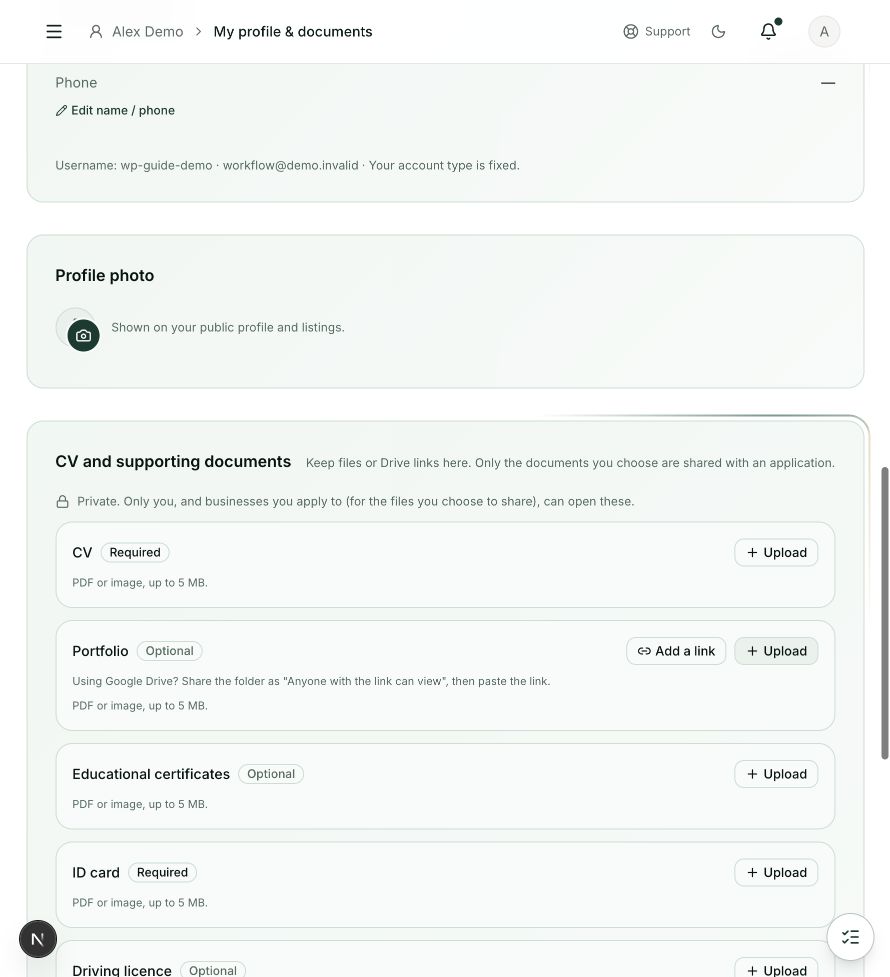
My profile & documents
Steps 1, 2, 3, 4 in this section. Where to find it: Individual side menu → My profile & documents. This is an example of this page, not an additional task. Use the written instructions for the exact controls and the current details in your account.
This screenshot illustrates the named page and steps above. Example names and values may differ from your account. Follow the written instructions, especially for payments.
Screenshot 1 of 1: My profile & documents
Page / dialog · Step 5
Apply now dialog
Where to go: Job details → Apply now
- Step 5.
When applying, select only the documents you want that employer to receive.
Good to know
Only upload your own documents. A job may require specific document types. Keep shared Drive links accessible to the recipient.