Finding & applying
Filter jobs by location, salary and qualifications
Narrow your results to roles that suit you.
For: Everyone
Start here: Jobs
Public website → Jobs, or individual Overview → Apply now
Each section below names the page or dialog to use. Move to the next page only when the instructions say to.
Step-by-step instructions
Page / dialog · Steps 1–5
Jobs
Where to go: Public website → Jobs, or individual Overview → Apply now
Open Jobs →- Step 1.
Open the Jobs page.
- Step 2.
Choose a filter, such as Job location, Expected salary or Required qualification.
- Step 3.
Type inside a searchable filter to find an option, then select it.
- Step 4.
Results update automatically when filters are selected.
- Step 5.
Use Clear to remove filters if too few jobs appear.
Relevant page screenshot
Example page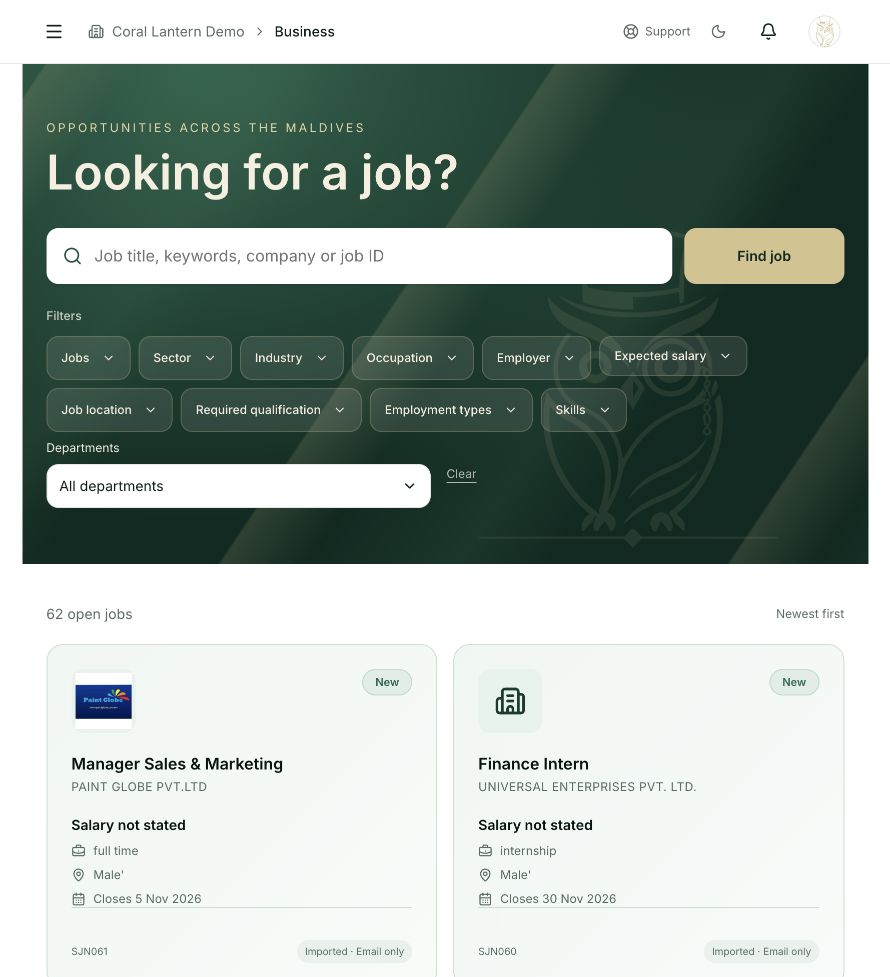
Jobs
Steps 1, 2, 3, 4, 5 in this section. Where to find it: Public website → Jobs, or individual Overview → Apply now. This is an example of this page, not an additional task. Use the written instructions for the exact controls and the current details in your account.
This screenshot illustrates the named page and steps above. Example names and values may differ from your account. Follow the written instructions, especially for payments.
Screenshot 1 of 1: Jobs
Good to know
The public Home page focuses on listings and statistics. The Jobs page includes the category and filter controls.