Finding & applying
Find an open job
Search by a job title, company name, keyword or job ID.
For: Everyone
Start here: Jobs
Public website → Jobs, or individual Overview → Apply now
Each section below names the page or dialog to use. Move to the next page only when the instructions say to.
Step-by-step instructions
Page / dialog · Steps 1–3
Jobs
Where to go: Public website → Jobs, or individual Overview → Apply now
Open Jobs →- Step 1.
Open Browse jobs, or use the Jobs page from the public website.
- Step 2.
Start typing in the search bar. Relevant suggestions appear after the first few letters.
- Step 3.
Choose a suggestion to open that job, or select Find job to see search results.
Relevant page screenshot
Example page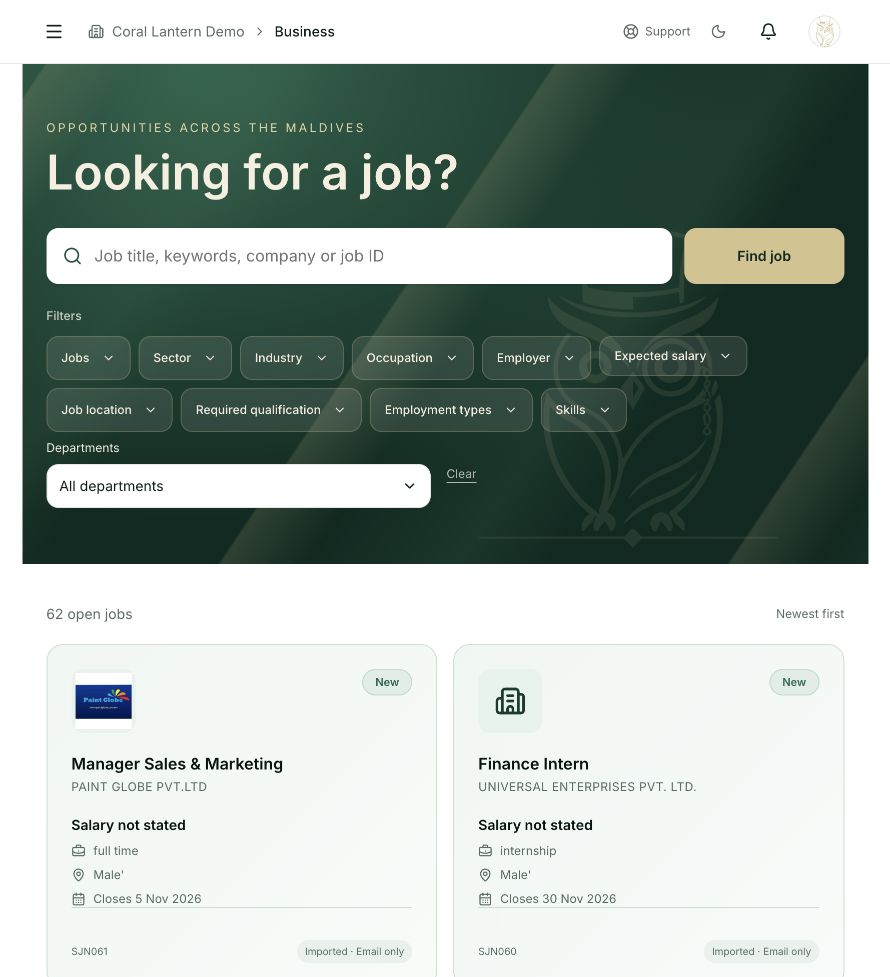
Jobs
Steps 1, 2, 3 in this section. Where to find it: Public website → Jobs, or individual Overview → Apply now. This is an example of this page, not an additional task. Use the written instructions for the exact controls and the current details in your account.
This screenshot illustrates the named page and steps above. Example names and values may differ from your account. Follow the written instructions, especially for payments.
Screenshot 1 of 1: Jobs
Page / dialog · Step 4
Job details
Where to go: Jobs → Choose an open job card
Browse jobs →- Step 4.
Open a job card and read the description, deadline, location, salary and application instructions.
Good to know
A job marked Expiring soon is close to its application deadline. Closed jobs no longer accept applications.